Connect OrbiRank to ChatGPT
Ask ChatGPT to audit your site, check rankings, and surface SEO opportunities — powered by live OrbiRank data. Works with ChatGPT Pro, Team, Enterprise, and Edu.
Requires ChatGPT Pro, Team, Enterprise, or EduHow to connect in 3 steps
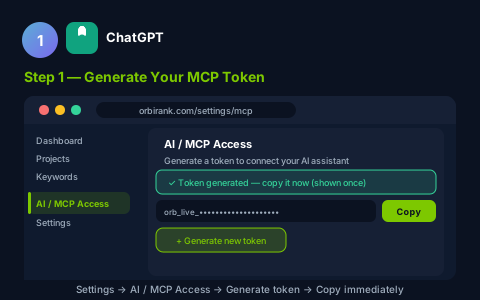
Sign in to OrbiRank. Go to Settings → AI / MCP Access → click Generate token. Copy the token immediately — it is shown only once.
https://orbirank.com/Settings#mcp
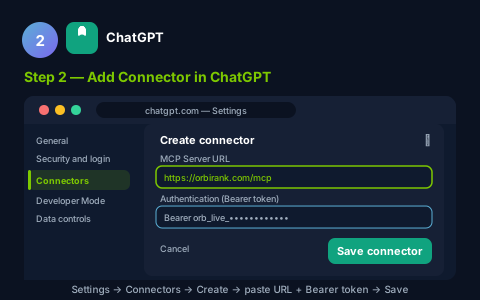
In ChatGPT: Settings → Security and login → Developer Mode → ON. Then: Settings → Connectors → Create → Add URL → paste the URL below. In the Auth field, enter Bearer YOUR_TOKEN (replace with the token from Step 1). Click Save.
https://orbirank.com/mcp
Start a new chat. Click "+" → More → Developer Mode → enable the OrbiRank connector. Ask:
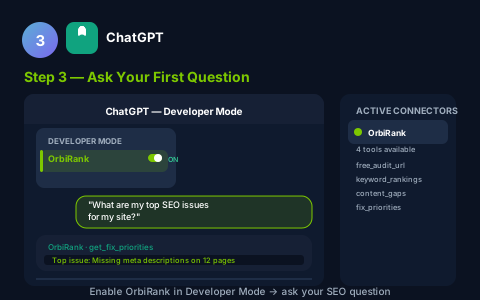
What you can ask ChatGPT to do
list_projects
See all your sites and their current SEO health scores at a glance.
get_project_status
Instant health score, open issues count, and next recommended action.
run_audit
Trigger a full technical audit — 20+ checks including Core Web Vitals.
get_audit_issues
Prioritised issues filterable by severity (Critical / High / Medium / Low).
get_rank_positions
Current keyword positions with 7-day and 30-day trend deltas.
get_keyword_opportunities
Content gaps where competitors rank but your site has no coverage.
Frequently asked questions
Do I need a paid OrbiRank plan to use the AI integration?
Is my data secure when I connect to my AI assistant?
Can I connect multiple AI tools at once?
Do I need a paid ChatGPT plan?
Ready to connect?
Generate your MCP token in seconds — no credit card, no setup fees.