Connect OrbiRank to Claude
Ask Claude to run SEO audits, check your rankings, and surface content opportunities — live data from your OrbiRank account, in plain English. No dashboard needed.
How to connect in 3 steps
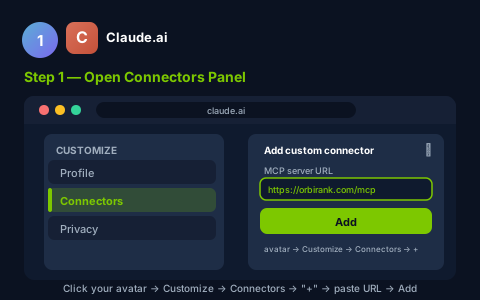
On claude.ai, click your avatar (top-right) → Customize → Connectors → click "+" → "Add custom connector" → paste the URL below → click Add. Claude will redirect you to OrbiRank to sign in — no password needed, just your email.
https://orbirank.com/mcp
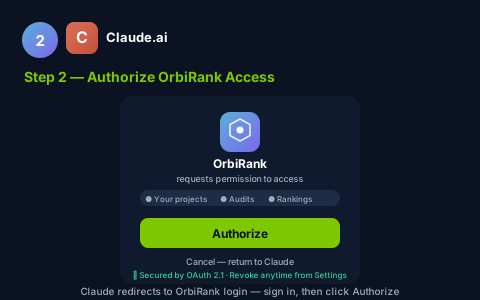
OrbiRank opens in a new window. Sign in with your email — a one-time passcode arrives in seconds. After login, you'll see a permissions screen. Click Authorize to grant Claude access to your SEO data.
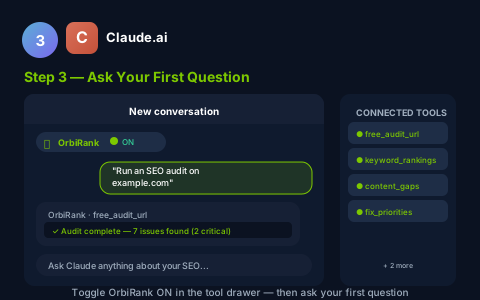
Back in Claude, toggle OrbiRank ON in the tools drawer (click "+" → Connectors). Then ask something like:
Using Claude Desktop instead?
In Claude Desktop → Claude menu → Settings → Developer → Edit Config. Add the config block below (replace YOUR_MCP_TOKEN with your token from Settings → AI / MCP Access). Save the file.
{
  "mcpServers": {
    "orbirank": {
      "url": "https://orbirank.com/mcp",
      "transport": "http",
      "headers": {
        "Authorization": "Bearer YOUR_MCP_TOKEN"
      }
    }
  }
}
Restart Claude Desktop. A wrench icon appears in chat — OrbiRank tools are ready. Note: a CLI login flow (npx @orbirank/cli login) is coming soon for a smoother setup experience.
What you can ask Claude to do
list_projects
See all your sites and their current SEO health scores at a glance.
get_project_status
Instant health score, open issues count, and next recommended action.
run_audit
Trigger a full technical audit — 20+ checks including Core Web Vitals.
get_audit_issues
Prioritised issues filterable by severity (Critical / High / Medium / Low).
get_rank_positions
Current keyword positions with 7-day and 30-day trend deltas.
get_keyword_opportunities
Content gaps where competitors rank but your site has no coverage.
Frequently asked questions
Do I need a paid OrbiRank plan to use the AI integration?
Is my data secure when I connect to my AI assistant?
Can I connect multiple AI tools at once?
Ready to connect?
Generate your MCP token in seconds — no credit card, no setup fees.